Articles by "IconPackager"
Showing posts with label IconPackager. Show all posts

Note : Skin Packs installer have easy and safe install option , Please unistall old or other version of skin packs before install new version. Before install close all runnig program , after finish restart your system.

Support Win7/8/8.1/10 x64/x86

! Re-named the .ee extentions to .exe, double-click it to begin installation of the icon-pack.! ))

This icon-patcher was created using the latest iPack Builder v2.1: Tool for icon customization created & developed by Mr-Blade.


[Click FRee DOwnload]
(8.5 MB, Full HD)
(This post contains only a selection of the set, the full set is in this zip file, in their original size.) Click Skip Ad at the top right to get to the download.

Lite Theme For Windows 8.1

Download
Author:Neiio


ICNSs
PNGs
iContainers
Dock!

Icons size: 256,128,48,32,16

Little tip for x64 users:
I know that with IP, on x64, after some times the yellow icons come back, so: replace the 3 "live folders", manually, in the imageres.dll from syswow64!!

Enjoy!

Use Stardock Icon Packager To Change Icon Link.

How to change Live Folder Icons using Stardock Icon Packager:

1. Open up Icon Packager.
2. Go to the Icons & Cursors Tab.
3. Below the tab selected, click on Folders
4. Change "Open Folder and Closed Folder" with the Empty Folder Icon you want.
5. Change "Live Folder (Back)" with the Live Folder (Back) icon that you want
6. Change "Live Folder (Front) with the Live Folder (Front) icon that you want.
7. Change "Live Folder (Data)" with the Full Folder (Data) icon that you want.
8. Click on 'Apply changes' on the right upper corner, and you are done.

(3.9 MB, Full HD)
(This post contains only a selection of the set, the full set is in this zip file, in their original size.) Click Skip Ad at the top right to get to the download.

Flat Icon (Q) Icon Pack

Download
Credit author: Thvg

Just Cute Icon Folders- Set of icons IconPackager . In the archive version 2.

Icons size: 256,128,48,32,16

Little tip for x64 users:
I know that with IP, on x64, after some times the yellow icons come back, so: replace the 3 "live folders", manually, in the imageres.dll from syswow64!!

Enjoy!

Use Stardock Icon Packager To Change Icon Link.

How to change Live Folder Icons using Stardock Icon Packager:

1. Open up Icon Packager.
2. Go to the Icons & Cursors Tab.
3. Below the tab selected, click on Folders
4. Change "Open Folder and Closed Folder" with the Empty Folder Icon you want.
5. Change "Live Folder (Back)" with the Live Folder (Back) icon that you want
6. Change "Live Folder (Front) with the Live Folder (Front) icon that you want.
7. Change "Live Folder (Data)" with the Full Folder (Data) icon that you want.
8. Click on 'Apply changes' on the right upper corner, and you are done.

How To Convert PNG to Ico [link]
(3.9 MB, Full HD)
(This post contains only a selection of the set, the full set is in this zip file, in their original size.) Click Skip Ad at the top right to get to the download.

How To Convert PNG to Ico

Download

Turquoise Icon Pack

Download
Credit Author: deleket


You need install 7tsp download here

Support xp, 7, 8/8.1 x64/x86


I hope you like.

Enjoy.


Installation:


(3.9 MB, Full HD)
(This post contains only a selection of the set, the full set is in this zip file, in their original size.) Click Skip Ad at the top right to get to the download.
(3.9 MB, Full HD)
(This post contains only a selection of the set, the full set is in this zip file, in their original size.) Click Skip Ad at the top right to get to the download.

Orian Theme for WINDOWS 8 and 8.1

Download

Turquoise Icon Pack

Download
Credit Author: Tornado

You need install 7tsp download here

Support xp, 7, 8/8.1 x64/x86


I hope you like.

Enjoy.


Installation:


(3.9 MB, Full HD)
(This post contains only a selection of the set, the full set is in this zip file, in their original size.) Click Skip Ad at the top right to get to the download.

How To Convert PNG to Ico

Download

Turquoise Icon Pack

Download
Credit Author: Tornado

Beepbluep Icon Pack

80
icons 256x128x48x32x16

Enjoy!

Use Stardock Icon Packager To Change Icon Link.

How to change Live Folder Icons using Stardock Icon Packager:

1. Open up Icon Packager.
2. Go to the Icons & Cursors Tab.
3. Below the tab selected, click on Folders
4. Change "Open Folder and Closed Folder" with the Empty Folder Icon you want.
5. Change "Live Folder (Back)" with the Live Folder (Back) icon that you want
6. Change "Live Folder (Front) with the Live Folder (Front) icon that you want.
7. Change "Live Folder (Data)" with the Full Folder (Data) icon that you want.
8. Click on 'Apply changes' on the right upper corner, and you are done.

(3.9 MB, Full HD)
(This post contains only a selection of the set, the full set is in this zip file, in their original size.) Click Skip Ad at the top right to get to the download.

Athos Theme For Windows 7

Download
Credit author: tchiro


This is additional pack for Flat Icons Pack with 45 new icons.


[drag down press Slow Speed Download]

(4.1 MB, Full HD)
(This post contains only a selection of the set, the full set is in this zip file, in their original size.) Click Skip Ad at the top right to get to the download.

Tulip Theme For Windows 8.1

Download

Credit: martz90

Just Cute Icon Folders- Set of icons IconPackager . In the archive version 2.

Icons size: 256,128,48,32,16

Little tip for x64 users:
I know that with IP, on x64, after some times the yellow icons come back, so: replace the 3 "live folders", manually, in the imageres.dll from syswow64!!

Enjoy!

Use Stardock Icon Packager To Change Icon Link.

How to change Live Folder Icons using Stardock Icon Packager:

1. Open up Icon Packager.
2. Go to the Icons & Cursors Tab.
3. Below the tab selected, click on Folders
4. Change "Open Folder and Closed Folder" with the Empty Folder Icon you want.
5. Change "Live Folder (Back)" with the Live Folder (Back) icon that you want
6. Change "Live Folder (Front) with the Live Folder (Front) icon that you want.
7. Change "Live Folder (Data)" with the Full Folder (Data) icon that you want.
8. Click on 'Apply changes' on the right upper corner, and you are done.

How To Convert PNG to Ico [link]
(3.9 MB, Full HD)
(This post contains only a selection of the set, the full set is in this zip file, in their original size.) Click Skip Ad at the top right to get to the download.

How To Convert PNG to Ico

Download

Turquoise Icon Pack

Download

For convert Png to Ico you can use IconWorkshop software

Tut


[drag down press Get Link]
(3.2 MB, Full HD)
(This post contains only a selection of the set, the full set is in this zip file, in their original size.) Click Skip Ad at the top right to get to the download.

Milk Wallpaper Full HD

Download

SAO Light Theme For Windows 8.1

Download


Just Cute Icon Folders- Set of icons IconPackager . In the archive version 2.

Icons size: 256,128,48,32,16

Little tip for x64 users:
I know that with IP, on x64, after some times the yellow icons come back, so: replace the 3 "live folders", manually, in the imageres.dll from syswow64!!

Enjoy!

Use Stardock Icon Packager To Change Icon Link.

How to change Live Folder Icons using Stardock Icon Packager:

1. Open up Icon Packager.
2. Go to the Icons & Cursors Tab.
3. Below the tab selected, click on Folders
4. Change "Open Folder and Closed Folder" with the Empty Folder Icon you want.
5. Change "Live Folder (Back)" with the Live Folder (Back) icon that you want
6. Change "Live Folder (Front) with the Live Folder (Front) icon that you want.
7. Change "Live Folder (Data)" with the Full Folder (Data) icon that you want.
8. Click on 'Apply changes' on the right upper corner, and you are done.

(3.9 MB, Full HD)
(This post contains only a selection of the set, the full set is in this zip file, in their original size.) Click Skip Ad at the top right to get to the download.

Turquoise Icon Pack

Download
Credit author: alenet21tutos

Oren - Set of icons IconPackager . In the archive version 2.

Icons size: 256,128,48,32,16

Little tip for x64 users:
I know that with IP, on x64, after some times the yellow icons come back, so: replace the 3 "live folders", manually, in the imageres.dll from syswow64!!

Enjoy!

Use Stardock Icon Packager To Change Icon Link.

How to change Live Folder Icons using Stardock Icon Packager:

1. Open up Icon Packager.
2. Go to the Icons & Cursors Tab.
3. Below the tab selected, click on Folders
4. Change "Open Folder and Closed Folder" with the Empty Folder Icon you want.
5. Change "Live Folder (Back)" with the Live Folder (Back) icon that you want
6. Change "Live Folder (Front) with the Live Folder (Front) icon that you want.
7. Change "Live Folder (Data)" with the Full Folder (Data) icon that you want.
8. Click on 'Apply changes' on the right upper corner, and you are done.

(3.9 MB, Full HD)
(This post contains only a selection of the set, the full set is in this zip file, in their original size.) Click Skip Ad at the top right to get to the download.

Flat Icon (Q) Icon Pack

Download
Credit author: BluPaper

Icons size: 256,128,48,32,16

Little tip for x64 users:
I know that with IP, on x64, after some times the yellow icons come back, so: replace the 3 "live folders", manually, in the imageres.dll from syswow64!!

Enjoy!

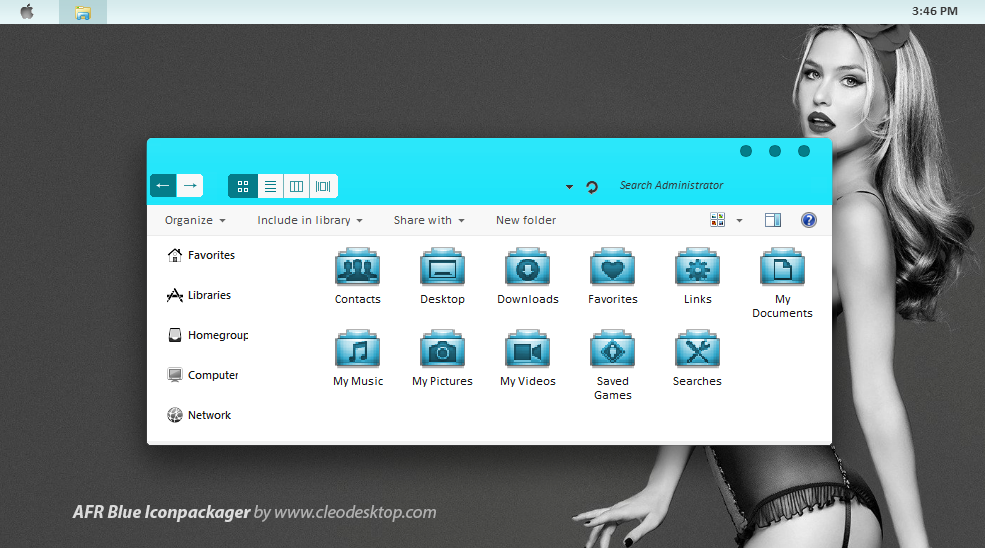
Credit AFR Bonus Colors by MustBeResult


Use Stardock Icon Packager To Change Icon Link.

How to change Live Folder Icons using Stardock Icon Packager:

1. Open up Icon Packager.
2. Go to the Icons & Cursors Tab.
3. Below the tab selected, click on Folders
4. Change "Open Folder and Closed Folder" with the Empty Folder Icon you want.
5. Change "Live Folder (Back)" with the Live Folder (Back) icon that you want
6. Change "Live Folder (Front) with the Live Folder (Front) icon that you want.
7. Change "Live Folder (Data)" with the Full Folder (Data) icon that you want.
8. Click on 'Apply changes' on the right upper corner, and you are done.


(2.4 MB, 33 icons Full HD)
(This post contains only a selection of the set, the full set is in this zip file, in their original size.) Click Skip Ad at the top right to get to the download.

Plastic Folders Icon Pack

Download


Icons for the Plastic theme

Included in the archive:
  • -256x256,48x48png,
  • -256x256,48x48,32x32,16x16ico,
  • -256x256,48x48psd.

Hope you like it !

you can use it for dock,skinpack,iconpakager,tuneup,custopack,7tsp or any other app you want!


(21.4 MB, 33 icons Full HD)
(This post contains only a selection of the set, the full set is in this zip file, in their original size.) Click Skip Ad at the top right to get to the download.

Plastic Folders Icon Pack

Download

Credit Author: Burnsplayguitar

Icons for the Plastic theme

Included in the archive:
  • -256x256,48x48png,
  • -256x256,48x48,32x32,16x16ico,
  • -256x256,48x48psd.

Hope you like it !

you can use it for dock,skinpack,iconpakager,tuneup,custopack,7tsp or any other app you want!


(21.4 MB, 33 icons Full HD)
(This post contains only a selection of the set, the full set is in this zip file, in their original size.) Click Skip Ad at the top right to get to the download.

Christmas Icons Pack 1

Download

Credit Author: msergt
Yosemite Icons for Windows by downloadsp


just Windows version of Mac OS X Yosemite Icons

33 png format 1024x1024

33 ico format 256x256

you can use it for dock,skinpack,iconpakager,tuneup,custopack,7tsp or any other app you want!


(21.4 MB, 33 icons Full HD)
(This post contains only a selection of the set, the full set is in this zip file, in their original size.) Click Skip Ad at the top right to get to the download.

OS X Yosemite Icons
Credit Author: downloadsp

Oren - Set of icons IconPackager . In the archive version 2.

Icons size: 256,128,48,32,16

Little tip for x64 users:
I know that with IP, on x64, after some times the yellow icons come back, so: replace the 3 "live folders", manually, in the imageres.dll from syswow64!!

Enjoy!

Use Stardock Icon Packager To Change Icon Link.

How to change Live Folder Icons using Stardock Icon Packager:

1. Open up Icon Packager.
2. Go to the Icons & Cursors Tab.
3. Below the tab selected, click on Folders
4. Change "Open Folder and Closed Folder" with the Empty Folder Icon you want.
5. Change "Live Folder (Back)" with the Live Folder (Back) icon that you want
6. Change "Live Folder (Front) with the Live Folder (Front) icon that you want.
7. Change "Live Folder (Data)" with the Full Folder (Data) icon that you want.
8. Click on 'Apply changes' on the right upper corner, and you are done.

(3.9 MB, Full HD)
(This post contains only a selection of the set, the full set is in this zip file, in their original size.) Click Skip Ad at the top right to get to the download.

Credit author: 7themes.su

Flamini :: IconPack ::

708 ICONS Different Sizes | 15.9 MB

just a few more goodies, psd included (512p)

I hope you like!

Enjoy.

(15.7 MB, 85 icons Full HD)
(This post contains only a selection of the set, the full set is in this zip file, in their original size.) Click Skip Ad at the top right to get to the download.


Mac-X Black Icons with 10 icons 48x48 ico and png.


Enjoy!

Use Stardock Icon Packager To Change Icon Link.

How to change Live Folder Icons using Stardock Icon Packager:

1. Open up Icon Packager.
2. Go to the Icons & Cursors Tab.
3. Below the tab selected, click on Folders
4. Change "Open Folder and Closed Folder" with the Empty Folder Icon you want.
5. Change "Live Folder (Back)" with the Live Folder (Back) icon that you want
6. Change "Live Folder (Front) with the Live Folder (Front) icon that you want.
7. Change "Live Folder (Data)" with the Full Folder (Data) icon that you want.
8. Click on 'Apply changes' on the right upper corner, and you are done.

(0.421 MB, Full HD)
(This post contains only a selection of the set, the full set is in this zip file, in their original size.) Click Skip Ad at the top right to get to the download.


LeopardXP Revised - Set of icons IconPackager style of Mac OC. In the archive version 2.

Icons size: 256,128,48,32,16

Little tip for x64 users:
I know that with IP, on x64, after some times the yellow icons come back, so: replace the 3 "live folders", manually, in the imageres.dll from syswow64!!

Enjoy!

Use Stardock Icon Packager To Change Icon Link.

How to change Live Folder Icons using Stardock Icon Packager:

1. Open up Icon Packager.
2. Go to the Icons & Cursors Tab.
3. Below the tab selected, click on Folders
4. Change "Open Folder and Closed Folder" with the Empty Folder Icon you want.
5. Change "Live Folder (Back)" with the Live Folder (Back) icon that you want
6. Change "Live Folder (Front) with the Live Folder (Front) icon that you want.
7. Change "Live Folder (Data)" with the Full Folder (Data) icon that you want.
8. Click on 'Apply changes' on the right upper corner, and you are done.

(12.9 MB, Full HD)
(This post contains only a selection of the set, the full set is in this zip file, in their original size.) Click Skip Ad at the top right to get to the download.

Credit author: MrEyePatch